Showing posts with label Community. Show all posts

Code Literacy: Computer Programming Resources for Teachers

**Updated**
Here is a video recording of the presentation. Thanks, audience!
Scroll down below for learning resources.

Also, much thanks to the statistics and research from code.org and other sources (listed in the speakers notes). Jambo on YouTube for the coding video and expectation vs. reality idea.


Hi folks!

In support of a little talk I'll be bumbling through during our whole-school staff PD day, I compiled a list of coding resources for teachers who are interested in learning a little bit about computer programming.

Presentation

Here's the presentation, including speaker's notes and citations if you're interested:


-------------------------------------

Beginner Coding Resources

If you are in search of ideas for how to use coding in your classroom for authentic, transferable learning that holds huge potential for the future of our students, maybe something from this list can help you out. No experience required.

I'm A Teacher, Not a Programmer! (Pre-made curricula and offline activites)

Edutopia: 3 Steps to becoming A Coding Teacher by Grant Smith
Rated resource lists, standards-aligned learning expectations, and even learning space considerations. A great place to start for teachers with no coding experience who aren't ready to jump into apps and games straight away.

K12CS.org
More than just programming, this non-profit has developed a full set of high level guidelines and practices modeled after those we might find in a traditional classroom. Not very specific, but great for getting ideas about how your normal classroom activities relate to coding projects and computational thinking.

Code.org - A full computer science curriculum for K-12 students and professional learning resources for teachers as well, this non-profit organization exists to spread awareness about the value of code in our children's future. Responsible for organizing the annual "Hour of Code" event.


I Learn by Doing. Got Any Video Lessons?

Khan Academy
From introductory computer programming basics to scripting for scientific research or drawing for web design, Khan Academy is a great place to start as a beginner who wants to learn to code.

Unity3D
Want to learn game design as well as coding, or perhaps involve some 3D design or animation?
This is my current learning and the many game design tutorial videos are fannnnntastic. This FREE real world tool has helped create many world famous games in 2017!

Skillshare.com
Not free, but they have a robust selection of programming tutorials for beginners that are focused on specific languages and areas, for example, Science teachers may be interested in PYTHON, the language most prevalent in scientific research applications.

I Just Want a Fun Project!

Scratch.mit.edu - Want to teach primary students how to make their own game or animated story? You need to make one yourself first, and you'll be surprised how easy it is to follow these detailed step-by-step guides that are fun and easy

TinkerCAD Circuits -  Arduino
Interested in electronics, and the hardware/robotics side of coding? Try the Arduino simulations on TinkerCAD and then perhaps move to using a real Arduino!

I Need To Get Physical (Robots/Electronics)
Don't want to spend all your time looking at a computer screen? These electronics and robotics kits vary in expense but all offer coding experience with a hardware connection and tons of online tutorials to help learn how to use them.

Arduino (ISPP Secondary has a class set of these!) ($25-$150)

Lego Ev3 Robotics (After school robotics club anyone?) ($350-$500)

I Want to Fix the Computer Science Gender Gap!

Made With Code by Google

-----------------------------------------

I sincerely hope these resources can help you get started as a coding teacher!
-M

ISPP Workshop: Parenting in the Digital Age (2017)


Questions about how your child is interacting with technology at home or at school? Nervous about terms such as "screen time", "internet privacy", YouTube, or online games?

This workshop will discuss how technology integrates with students' daily lives, and how you as a parent can become better equipped to guide and participate with your children's use of technology. 

Join me and our elementary librarian, Rachel Jackson, to discuss these important issues this Wednesday!

-M

ISPP Parent's Guide to YouTube

Hi folks!
I'm thrilled to share a glimpse into how elementary students use YouTube outside of school, some tips on finding a healthy balance for your child, and advice on protecting their privacy online.

VIDEO: Parent's Guide to YouTube (2017)

ISPP Students and YouTube Use

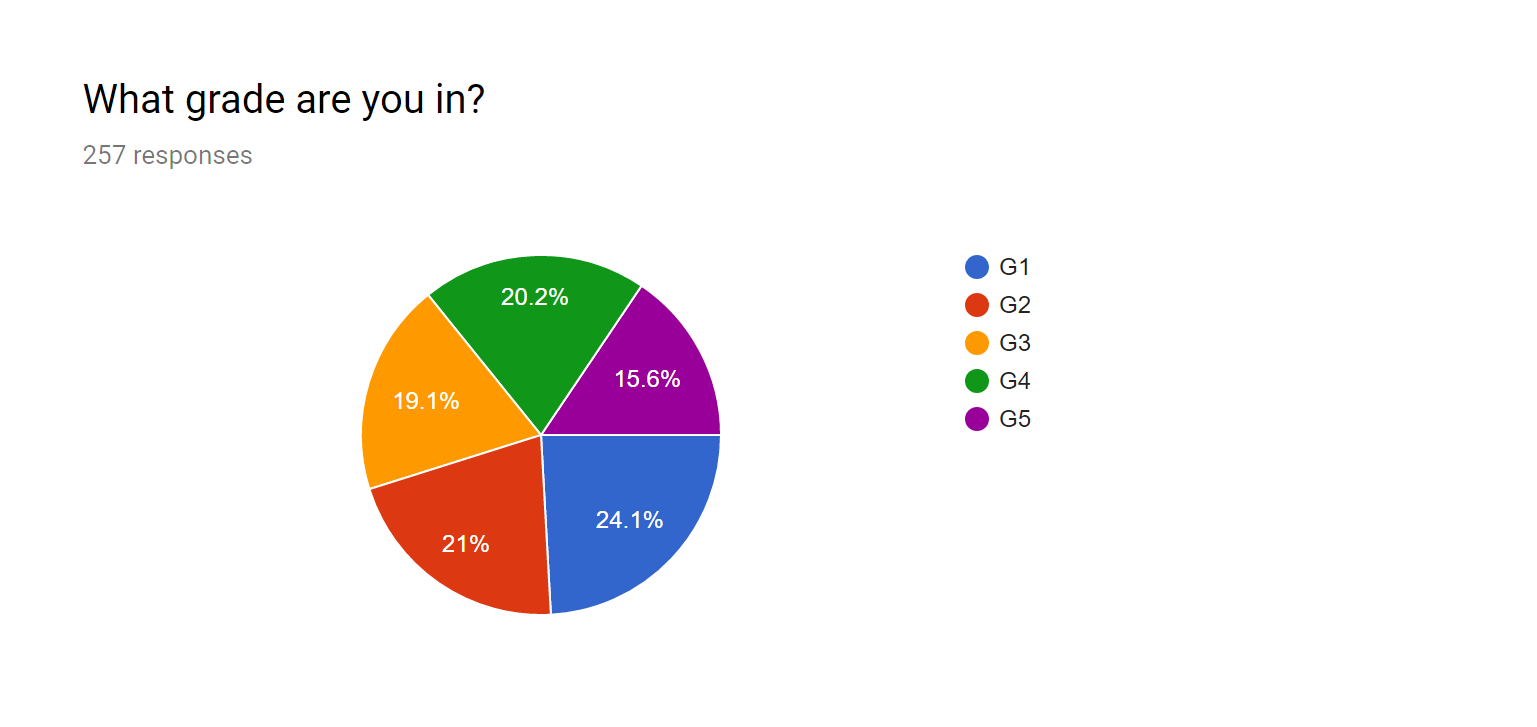
Students from Grade 1 to Grade 5 were asked to complete a short survey regarding their use of YouTube outside of school. Grade 1 and 2 students were guided through the questions by teachers. All students were encouraged to provide honest answers with no repercussions for identifying choices or behaviour discouraged or prohibited at school.

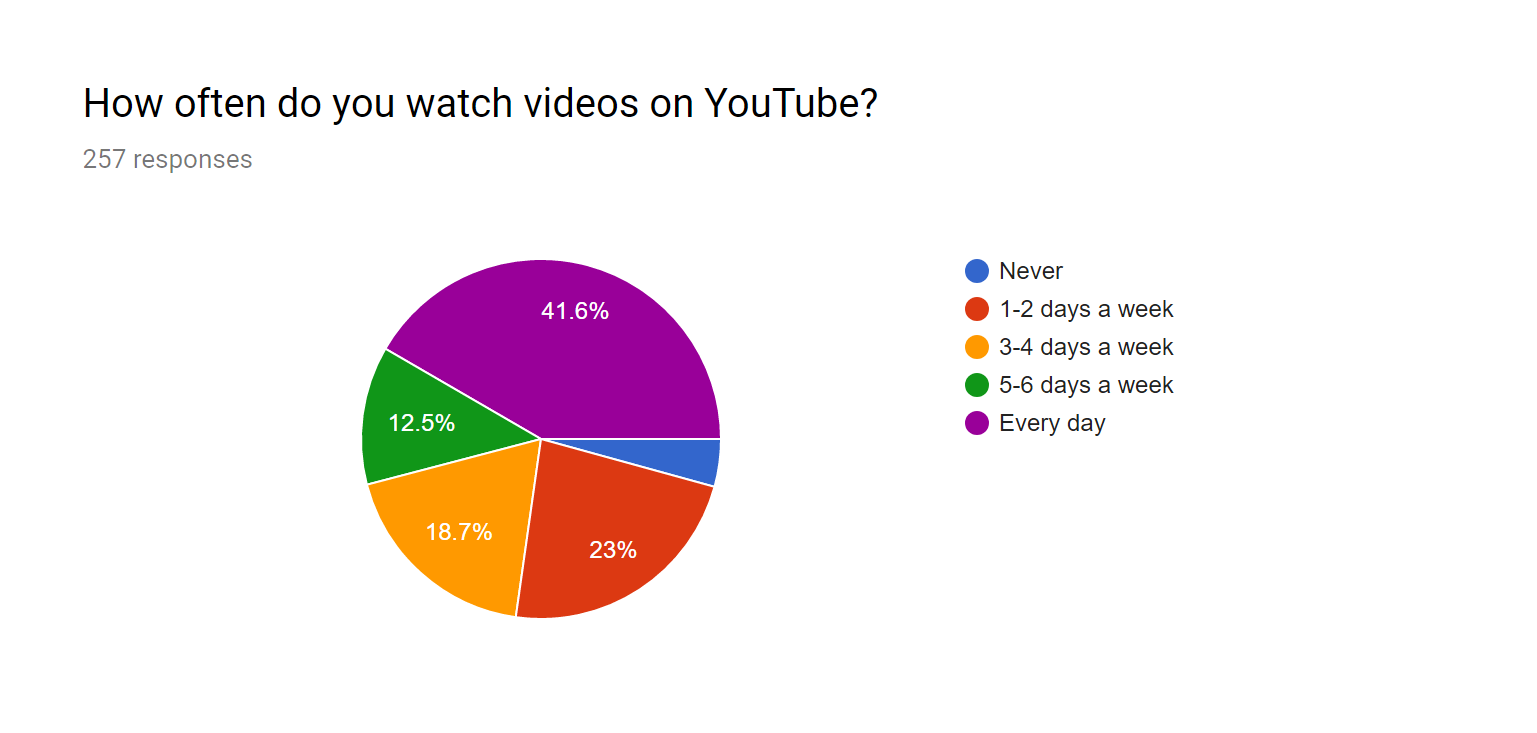
With 54% of student respondents watching videos five or more days a week, YouTube clearly plays a major role in the entertainment choices of students at ISPP. Most content appears to be fine (if a bit silly or weird). Many popular channels feature educational, DIY or other productive content. Following is a summary of data collected from 257 elementary student respondents to a survey regarding their use of YouTube. All answers were provided independently by students, and may include all the biases and irregularities that go along with that.

TOP 10 Most popular YouTube channels by ISPP survey respondents (257 responses):
Gaming, challenges, silliness
2) Stampy
Minecraft and educational, silliness
vLogs, fashion, cosmetics, comedy (teen)
vLogs, challenges, silliness, games
Minecraft
Gaming, silliness (Inappropriate content)
vLogs, comedy for teens
vLogs, DIY, fashion, life tips, comedy (teen)
vLogs, challenges, comedy
Comedy skits and vLogs, managed by parents.

Out of a total 197 YouTube channels recommended by 257 elementary survey respondents, these received the most mentions. Though some of these channels may contain risque content targeted at teens and older, the creators mostly self-censor to reach a wider audience. Ten minute reviews of each only identified one channel containing harsh language, violence and aggression that was clearly inappropriate for elementary school children (#6, pewdiepie). If you investigate further, please send your opinions and reviews to the technology coach, or leave a comment below.


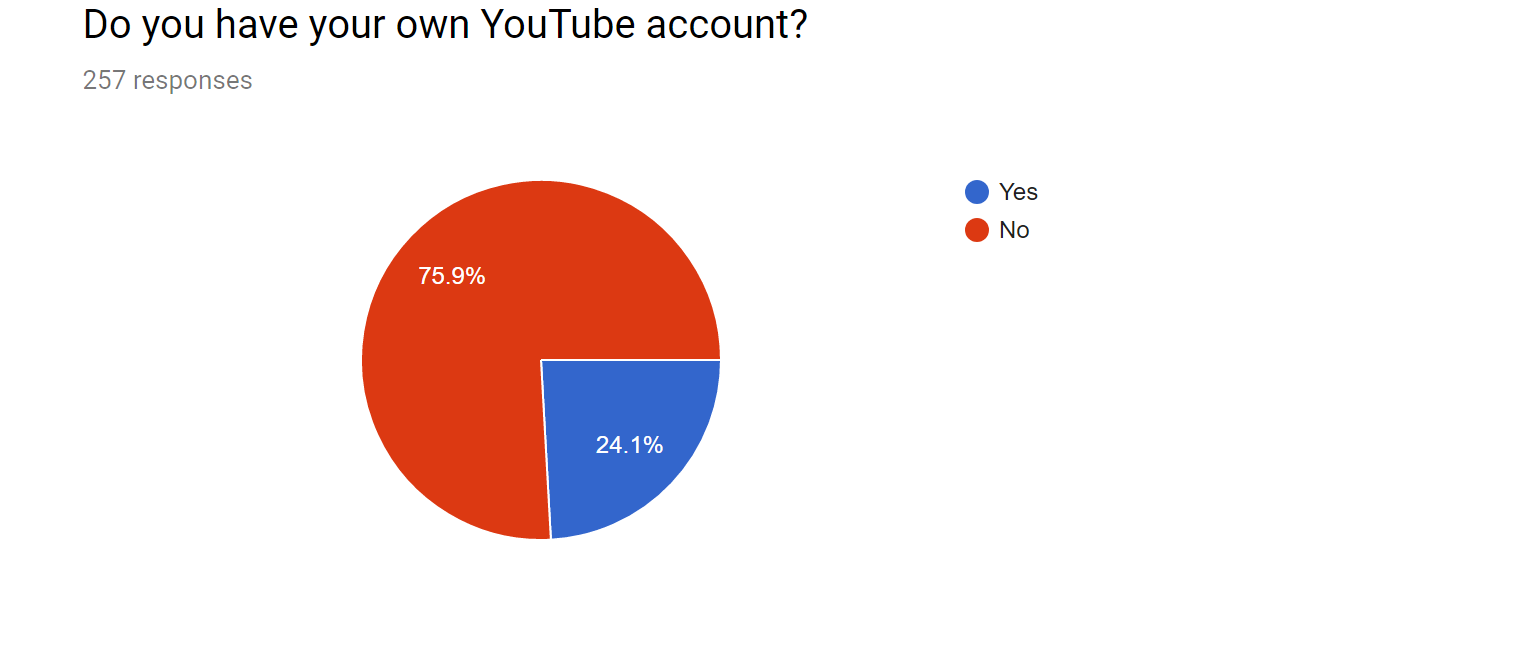
Notably, our school accounts do not support YouTube, so this requires a private email address to create. Many parents ask about this during conferences. It's not currently an option in Cambodia, but should this change in the future the school will review our policy to see if this is the best option for protecting our kids.

Students are encouraged to use their school accounts as much as possible, but it's more child-appropriate, secure and accountable to use a private account with YouTube than no account at all.

Outside of school, a private account is necessary to use restricted mode (formerly safe mode), which removes all content tagged inappropriate for kids by YouTube.

Please see the Parent’s Guide to YouTube video for more information.

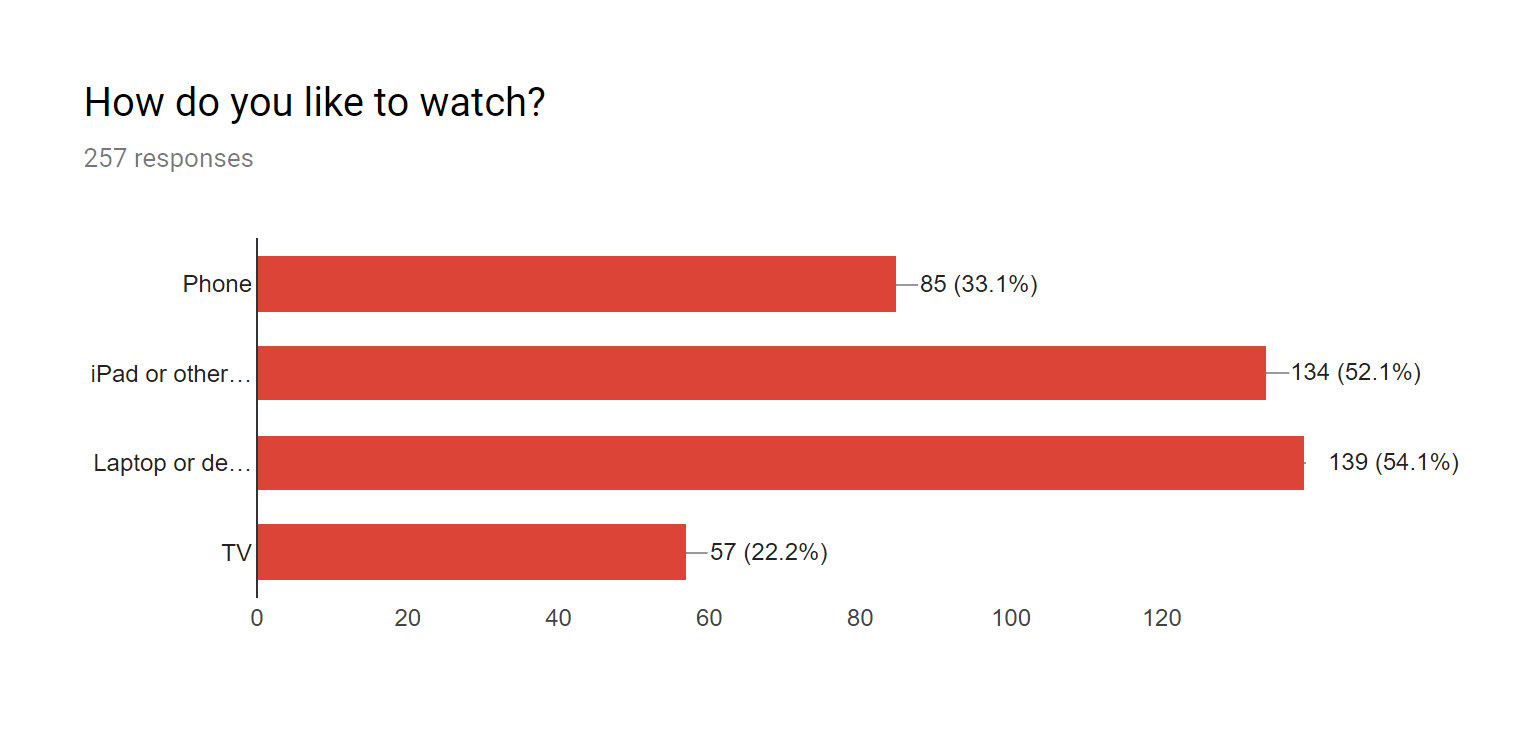
Phone/ iPad or other tablet / Laptop or Desktop computer / TV

Most students watch YouTube on a laptop or desktop computer, with iPads and tablets coming in a close second. Note that students were able to select more than one device here, and many students have access to more than one device for consuming video. This has implications for parental controls such as restricted mode, which require an account to be signed in, and identifies a clear weakness in website filtering or blocking software unless it can be consistently applied across all devices the child uses. It may be interesting to note the trend that younger children prefer tablet and phone devices, with older children preferring laptops or desktop computers.


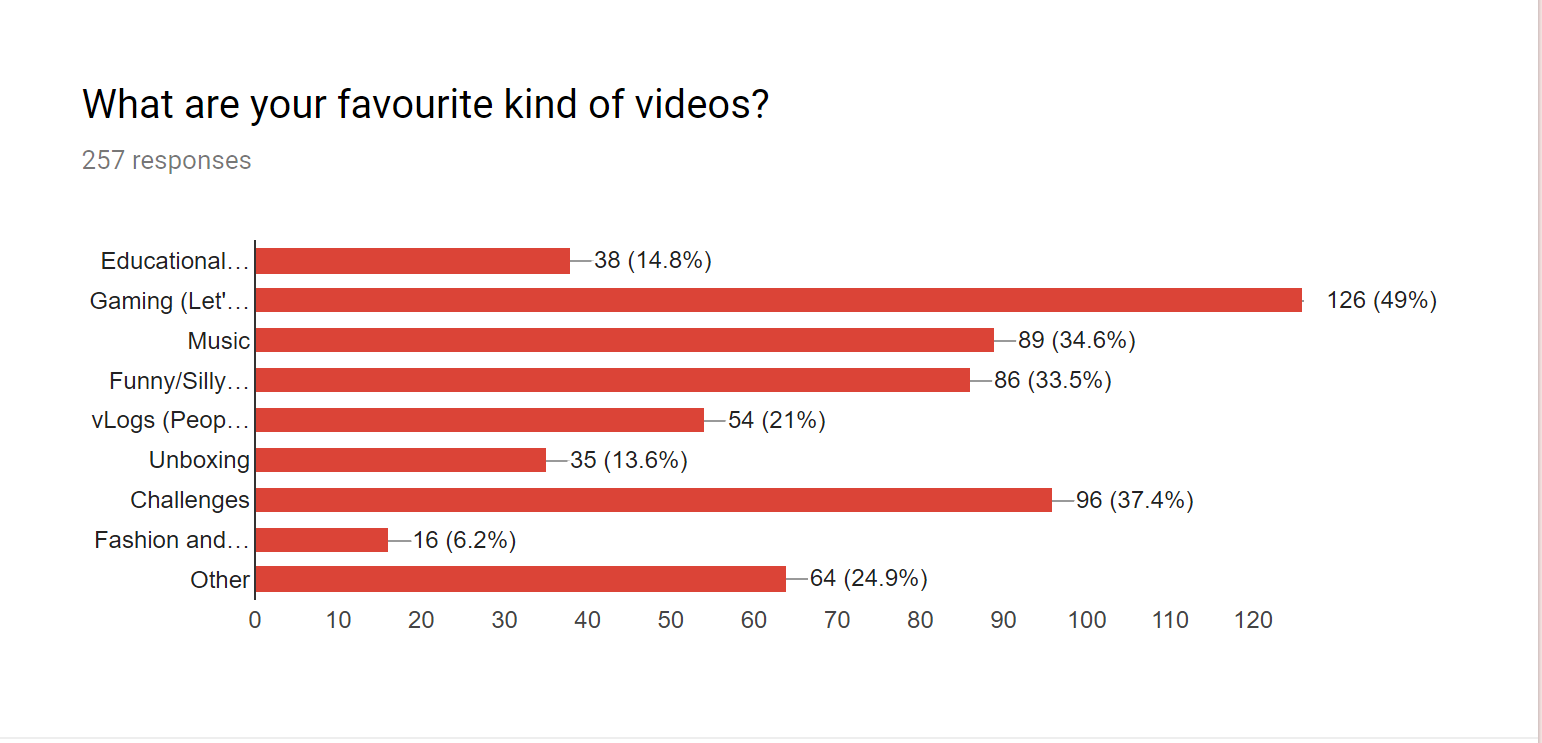
These categories were taken from YouTube analytics and Common Sense Media studies of the most popular genres of YouTube videos.
  • "Let's play" videos (playing videogames with commentary) were by far the most popular category of video, highly popular with Grades 1-3 where they often do not have access to the games themselves.
  • "Challenges" were a big trend popular with grades 2-5. Flash mobs, mannequin challenge and bottle flip are examples of these.
  • Fashion and cosmetics, a huge category for YouTube and teens, was oddly only popular in Grade 3 (and a couple G5s).
  • vLogs (video blogs) were non-existent in G1/G2, but very popular in G3+. This category is worth note because of the personal nature of the videos and likelihood of these YouTubers being role models for kids. This category often blends with Fashion and Cosmetics, where YouTube personalities may endorse products or discuss their personal lifestyle choices (including fashion). May include examples from all other categories.
  • Educational (how-to) videos were very popular with 4th and 5th graders, but almost non-existent below that.
  • Music was popular in all grades, Funny/Silly stuff in all grades.


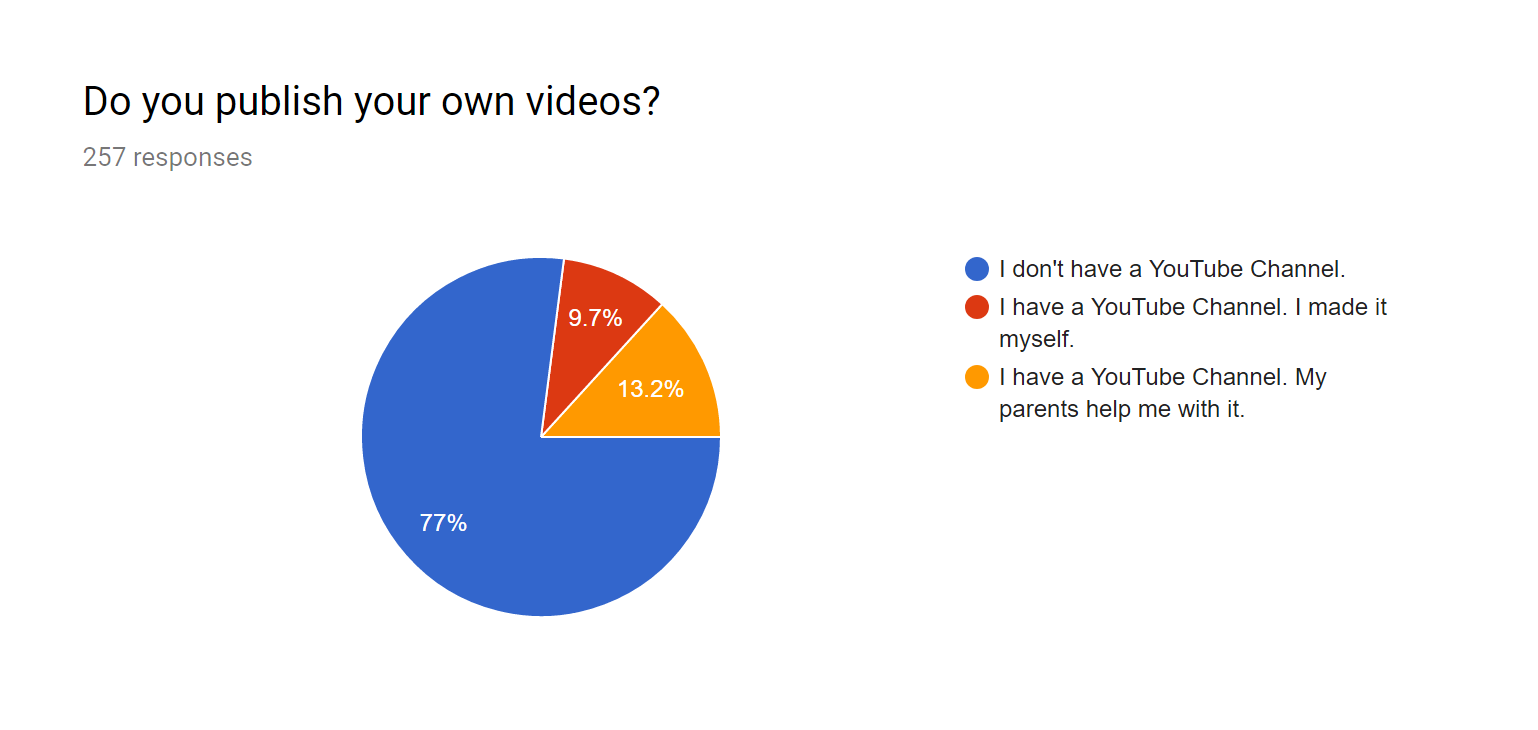
The 9.7% here that are publishing on YouTube without parental help are 25 students made up of 5th graders (11), 4th graders (8), and 3rd graders (6). Though this is a minority, it indicates an increased need for digital citizenship and privacy conversations regarding online publishing in these grade levels.
Please see the Parent’s Guide to YouTube video for more information on publishing and privacy.

Resources


----------------------------------------------------------------------------------------------

Thank you so much for reading, watching, and being engaged with what your children are doing online.

It’s taken me a few months to complete this project, and I appreciate the patience of those who’ve been discussing it with me this whole time. I hope the time spent on research and in my own efforts to better understand our students will be valuable to everyone! Our students, our children, are living in a world with unprecedented access to media. It is our responsibility to become a part of that.

I welcome feedback, suggestions, your own experience and comments via ISPP email or comments here on the blog.

Yours truly,

Matt
PYP Technology Coach

Resources: Parenting in the Digital Age


This is a supplemental post for the presentation Parenting in the Digital Age, live at ISPP Elementary on Wednesday, October 26th, 2016.

Presentation Slides


Digital Citizenship (Common Sense Media)

Full K-12 Digital Citizenship curriculum for all ages including online and offline activities that can be used both at home and in schools. ISPP Elementary draws upon these resources but it does not represent official curriculum for the IB. Many resources for building understanding about children learning in the digital age.

Tools and Digital Learning Resources Used at School

If you're curious about what your child is doing on their device, or looking for something new to try, here's a list of some of the things we're using at school. Always available from the Home Learning link on the blog.

Websites, Apps and Games (2016)

Resources from the Library (Event Handout)

The digital world is a powerful place for students to connect, communicate and create. The Elementary Library suggests these resources to help parents make informed decisions about parenting in the digital age.

StaySafeOnline.org: Raising Digital Citizens
Common Sense Media: Parent Concerns
Netsmartz: Information for Parents

(BOOK) Screenwise by Devorah Heitner (Amazon.com)

What You Can Do

Make time for technology… and no technology.

Know what your children are reading, watching and playing. “Screen time” doesn’t exist. Know the specifics and experiment with the technology they use.

Devices before bedtime are proven to disrupt sleep patterns. Make sure kids power down at least 30 minutes before going to bed, and that devices are not available during this time.

You are not alone. Talk to other parents, teachers and use online resources to learn more about the tools your kids are using.

Empowered Use Policy

We're kicking off the 2016/17 school year with EMPOWERMENT!

Acceptable use is simply not acceptable. At ISPP, we want an Empowered Use Policy, demonstrating our essential agreements on digital citizenship and the strength of technology to empower learners who know how to use it appropriately. Check it out!


Phnom Penh Youth Film Festival!

Check out this awesome event for young filmmakers! It's coming up in March.

With all the aspiring youtubers, action documentaries, stop motion animators and other creative video aficionados running around our school, surely some would be interested in showcasing their work and winning some prizes?


Digital Citizenship Week 2015

Hi folks!

I'm joining in with the responsible web gurus at sites like Common Sense Media and InCtrl to support Digital Citizenship Week this October 19th-26th.

With all the technology that children are being exposed to, it is definitely time to "have the talk" with them about how to be safe and effective in the online world. The talk: parent version (teacher version).


This is a huge topic (you can find the main points from the link at the top of my blog). The important thing to note here is that this isn't just new for kids. Most of the technology and social media issues we are dealing with are new to adults as well as children; we are learning this stuff together. If you think you fall into the "learner" category on this, or rely on your kids to teach you about technology, check out this amazing parent concerns knowledge base to bring yourself up to speed on what may be happening in your child's digital world and how to learn more about these issues.

Did you see that last link there? It was important. Let's do it again.
Find help for parent concerns about technology here.

--------------

Now for the fun stuff. It is a pretty serious topic, but it's something kids can relate to with the right tools and examples. Here are some interactive videos and games that will teach kids about digital citizenship issues that they can relate to!

Digital Passport (Recommended for Grades 2-4)
This free site has five clever games that are both fun to play and teach valuable lessons about digital citizenship with included videos by elementary students.
  • In Twalkers, students learn why it's important to avoid multitasking with a cell phone. They consider the benefits of focusing on one task at a time.
  • In Share Jumper, students evaluate examples of online messages. They decide what information is appropriate to share and when. Students are also reminded that nothing is truly "private" or "erasable" online.
  • In E-volve, students make choices about what to do if they or their friends are cyberbullied. They are encouraged to "evolve" into an “Upstander” – someone who takes action to stop cyberbullying, rather than standing by.
  • In Search Shark, students learn how to choose effective keywords for searching online. They practice selecting keywords that are most relevant to a search prompt. Along the way, students discover hints for narrowing their search results.
  • In Mix-n-Mash, students remix media content to create a new creative piece. Along the way, they give proper credit to the artists whose images and sound clips they use.
Requires a free account. ISPP Students in Grade 2 and 3 can get their account from their teacher, or you can create your own family account at home. It's also available as a $2 app for iPad.


Digital Compass (Recommended for Grades 5-9)
This free interactive adventure puts students in the shoes of cartoon characters experiencing real-world digital dilemmas and allows them to choose their own path to experience the possible outcomes of the choices they make. Good or bad decisions reveal interesting plot twists and mini-games. No account required and it's also available free on iPad and Google Play!

--------------

I really hope you'll try these out and help raise awareness for Digital Citizenship week. Help me build a future where our information is safe, we celebrate sharing, and no one TYPES IN ALL CAPITALS UNLESS THEY ARE SHOUTING.
:)

Thanks for reading!

-M


Growth


Let's talk about growth.

Personal growth, professional growth, becoming lifelong learners. These things are crucial to our time. 

Technology in our schools and workplaces has become a norm, rather than an exception, within the past 25 years. As the pace of change increases with new opportunities, tools, and methods of learning, so does our expectation for performance and development. The time of being a content-matter expert appears to be shifting toward a time of learning experts, with the skills of inquiry, experimentation, adaptation and collaboration providing the foundation for constantly changing personal and career expectations. 

To affect change, develop our communities and ourselves, one needs to be constantly growing. To be constantly growing, we need to be constantly learning.


These "learning skills" are sometimes considered as technology-related or as aspects of information literacy, with prospective job descriptions to match. With current definitions, a huge portion of future jobs will be labeled as "technology" jobs simply because they use tools that require constant evolution and growth. Technology is one of the leading proponents of new learner culture, providing efficacy tools and access to information on previously unprecedented levels. Let me share this infographic (again):

Projected growth in computer science jobs in the USA. (Source Data)

It's indicative of the fact that not just new jobs, but also traditional ones, must change to survive in these times. Future employers are probably going to be begging for information literate workers who can adapt to new programming languages, digital workspaces and communication methods while their focus is on the job at hand, not on doing constant training courses. The demand already appears to be increasing, albeit carrying some technology-specific job titles so far. If you're considering your finances, check out these numbers:

      
Top ten jobs with largest projected salary gains in the USA. (Forbes.com 2014)


The importance of throwing all this data at you on a Monday morning? Am I trying to convert you or your students/children into computer scientists? Never! (Well, maybe a little).

The point I endeavor to make is that a significant portion of the skills we need to become potent lifelong learners are information literacy skills, and that those skills are a foundation for academic and professional growth in children and adults alike. Technology education is not just skill development... it's about learning to be better learners. Information literacy skills are essential for the workplaces of the future, whether you are a programmer or not, and the more chances we have to develop them the better. Teaching the tools exclusively is a waste of time, a road to obsolescence. It is crucial that we learn to be better learners, to make better choices, and to never stop trying to better yourself and your community.


-M


The Hour of Code will soon begin!

Next week (Dec. 9 & 11) ISPP will be hosting two events to join in a huge worldwide event: The Hour of Code.

We're going to be making and playing games, learning about how computer programs work and respecting the fact that code exists all around us: online and off, in our phones, cars, clocks, and microwaves, from games to calculators, the code is there... and schools are barely studying it!

Learning the basics of how computer programming works is actually super easy... and it makes for great team learning between friends and families. At our Hour of Code events we'll have everything you need to help you get started, but feel free to bring your own computer or program if you like! This is an all ages event and you're most welcome to bring friends, those who complete the hour will earn a certificate and get a great start to understanding how all these apps and websites actually work.

We have two events:
Tuesday, December 9th, Elementary campus and Thursday, December 11th, Secondary campus.


-M

Empowering Our Community

There's nothing quite so inspiring as being surrounded by innovators, all talking about something you love.

The past four days have been a whirlwind of sorts, as the intrepid Ms. Chelsea Woods and I leaped into the maelstrom of discussion that circulates around the best educational technology event in Asia: Learning 2.0. We were there with education and tech leaders from loads of international schools to attend sessions ranging from school culture to technical tools, and everything in between.
The theme of this years event?
Empowering your community.
And if you're reading this now, that means you.


Although this has long been our philosophy in-house, over the next month ISPP’s tech team will be extending our reach to help foster growth and empowerment of the learning community here in Cambodia.


NEXT WEEKEND (October 10th and 11th) Several of our staff will be offering sessions at an community lead event called teKHin2014, a collaboration among teachers and tech leaders of local international schools to share tools, techniques and lesson ideas involving educational technology. If you’re looking for something new to try out with a class or at home, this is going to be a great event with many sessions aimed at absolute beginners as well as the techy folks. We’re talking Blogging, robotics, minecraft, flipped classrooms, 3D printing, animation, Google Apps … and that’s just getting started. Remember, this is not just for teachers, anyone interested is welcome! See the link to register.
October 27th at ISPP Elementary I will be hosting a session for parents on Cyber Awareness to talk about what children are doing with tech, how we can help keep them safe while they’re doing it, and to help start a dialogue between parents about their children’s tech use. You can contact me or the Elementary office for more information.


What would you like to see and learn more about in this age of technology integration, a time where the “real” world and the “digital” world are one and the same?
I hope you’ll join the discussion!


-M