

ISPP Parent's Guide to YouTube
Hi folks!I'm thrilled to share a glimpse into how elementary students use YouTube outside of school, some tips on finding a healthy balance for your child, and advice on protecting their privacy online.
VIDEO: Parent's Guide to YouTube (2017)
ISPP Students and YouTube Use
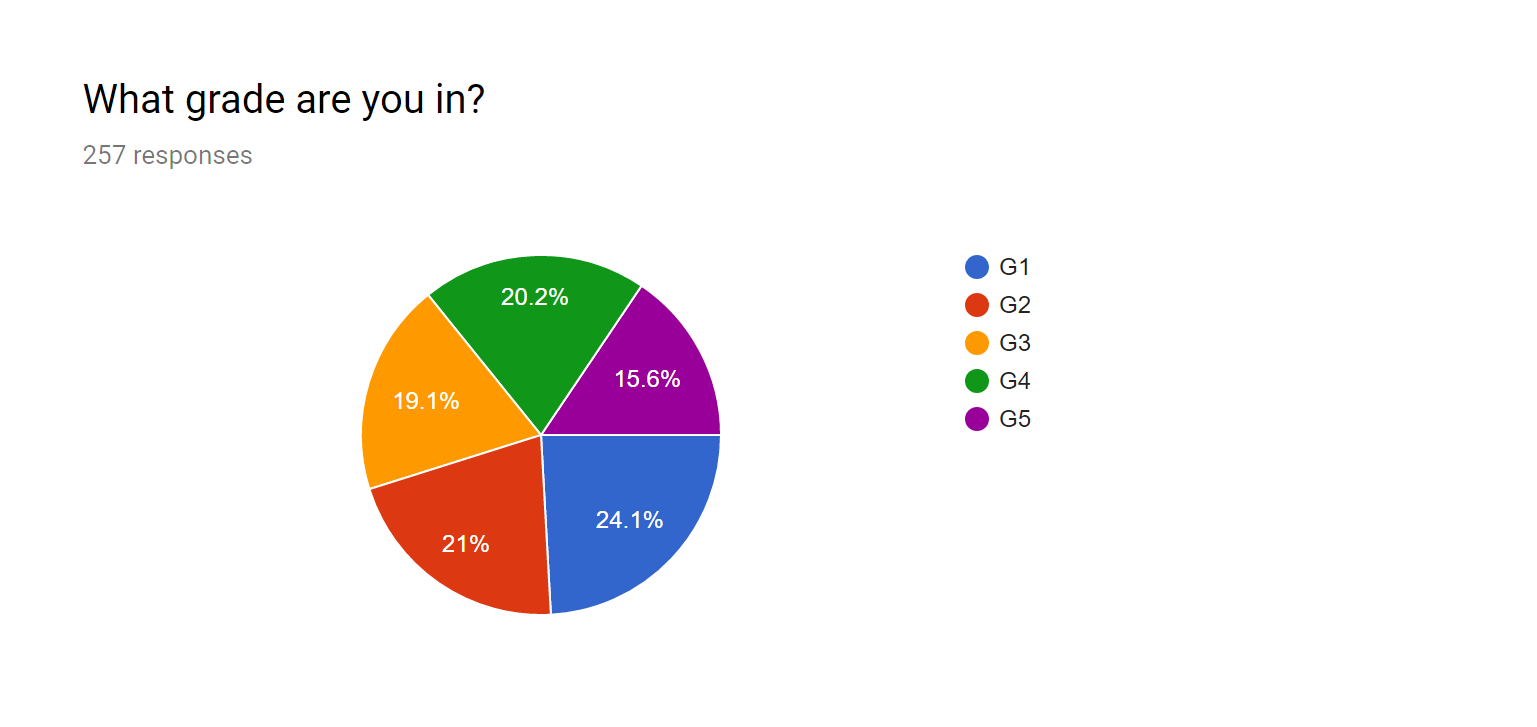
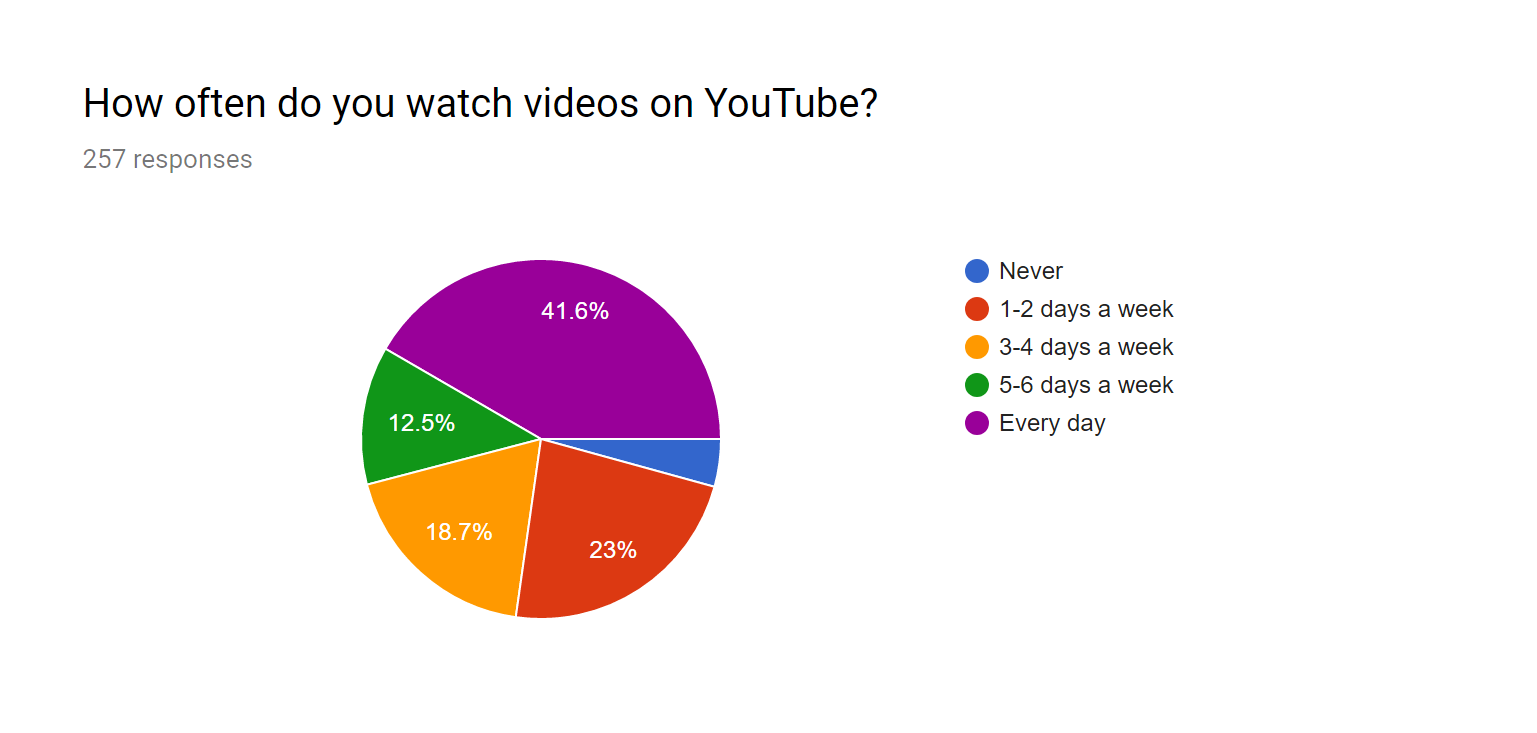
Students from Grade 1 to Grade 5 were asked to complete a short survey regarding their use of YouTube outside of school. Grade 1 and 2 students were guided through the questions by teachers. All students were encouraged to provide honest answers with no repercussions for identifying choices or behaviour discouraged or prohibited at school.With 54% of student respondents watching videos five or more days a week, YouTube clearly plays a major role in the entertainment choices of students at ISPP. Most content appears to be fine (if a bit silly or weird). Many popular channels feature educational, DIY or other productive content. Following is a summary of data collected from 257 elementary student respondents to a survey regarding their use of YouTube. All answers were provided independently by students, and may include all the biases and irregularities that go along with that.
TOP 10 Most popular YouTube channels by ISPP survey respondents (257 responses):
1) DanTDM
|
Gaming, challenges, silliness
|
2) Stampy
|
Minecraft and educational, silliness
|
vLogs, fashion, cosmetics, comedy (teen)
| |
4) Guava Juice
|
vLogs, challenges, silliness, games
|
5) Popular MMOS
|
Minecraft
|
6) Pewdiepie
|
Gaming, silliness (Inappropriate content)
|
vLogs, comedy for teens
| |
8) LaurDIY
|
vLogs, DIY, fashion, life tips, comedy (teen)
|
vLogs, challenges, comedy
| |
10) Haschak Sisters
|
Comedy skits and vLogs, managed by parents.
|
Out of a total 197 YouTube channels recommended by 257 elementary survey respondents, these received the most mentions. Though some of these channels may contain risque content targeted at teens and older, the creators mostly self-censor to reach a wider audience. Ten minute reviews of each only identified one channel containing harsh language, violence and aggression that was clearly inappropriate for elementary school children (#6, pewdiepie). If you investigate further, please send your opinions and reviews to the technology coach, or leave a comment below.
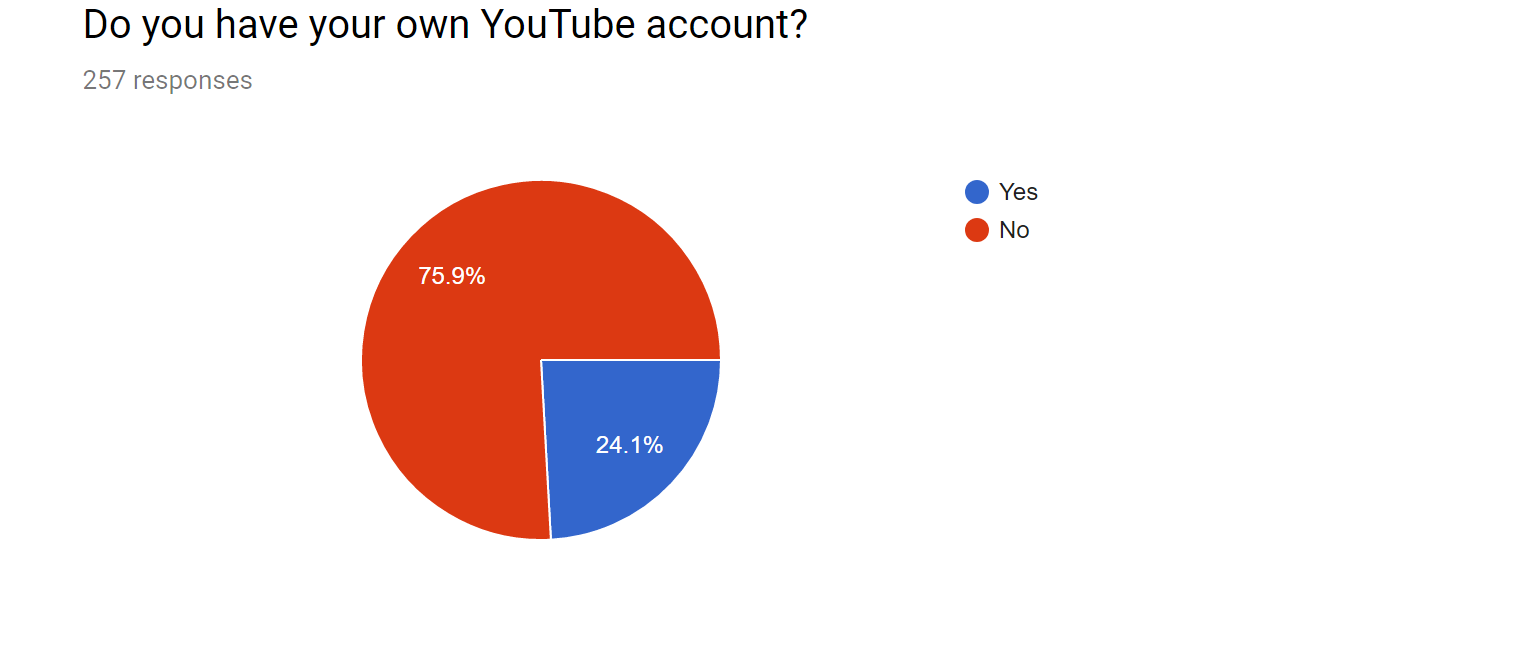
Notably, our school accounts do not support YouTube, so this requires a private email address to create. Many parents ask about this during conferences. It's not currently an option in Cambodia, but should this change in the future the school will review our policy to see if this is the best option for protecting our kids.
Students are encouraged to use their school accounts as much as possible, but it's more child-appropriate, secure and accountable to use a private account with YouTube than no account at all.
Outside of school, a private account is necessary to use restricted mode (formerly safe mode), which removes all content tagged inappropriate for kids by YouTube.
Please see the Parent’s Guide to YouTube video for more information.
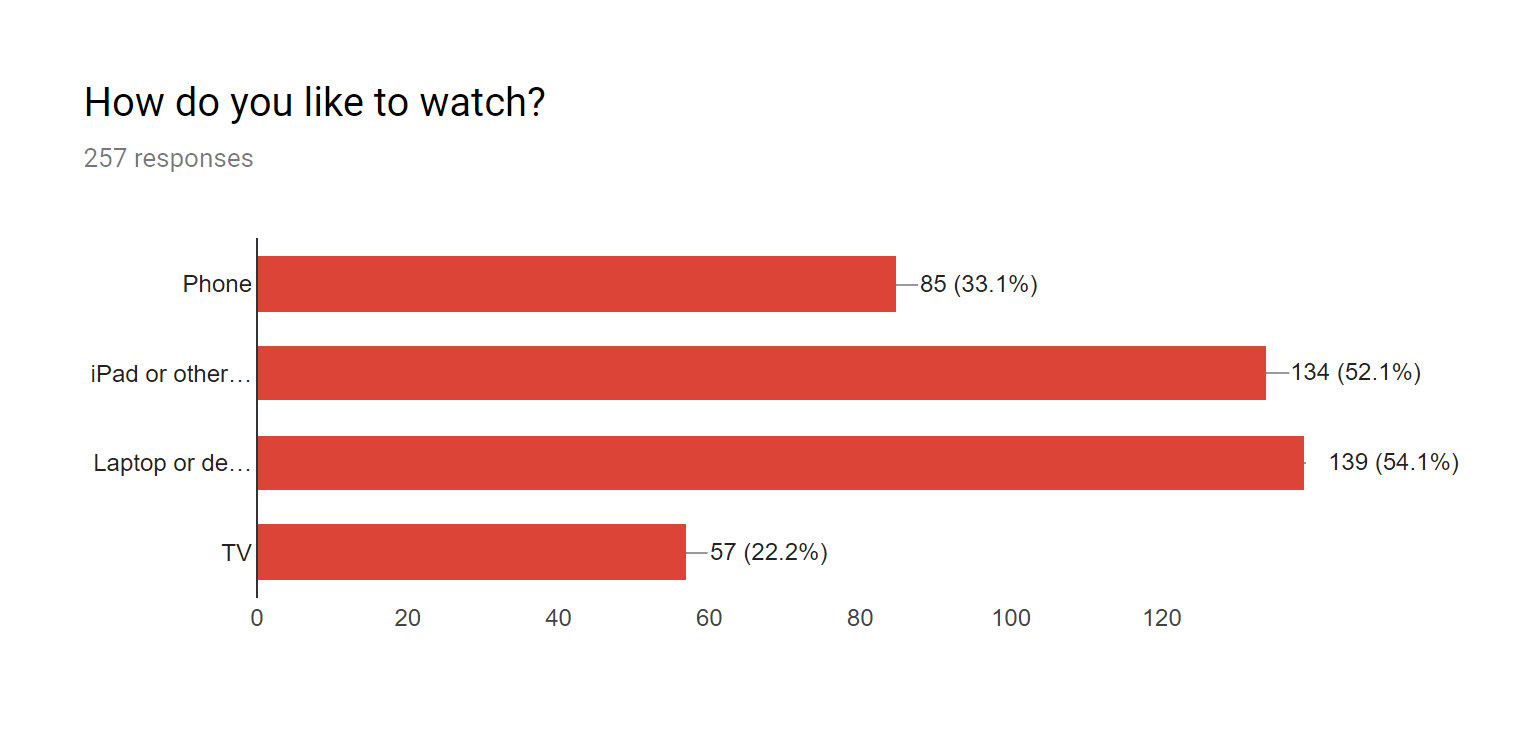
Phone/ iPad or other tablet / Laptop or Desktop computer / TV
Most students watch YouTube on a laptop or desktop computer, with iPads and tablets coming in a close second. Note that students were able to select more than one device here, and many students have access to more than one device for consuming video. This has implications for parental controls such as restricted mode, which require an account to be signed in, and identifies a clear weakness in website filtering or blocking software unless it can be consistently applied across all devices the child uses. It may be interesting to note the trend that younger children prefer tablet and phone devices, with older children preferring laptops or desktop computers.
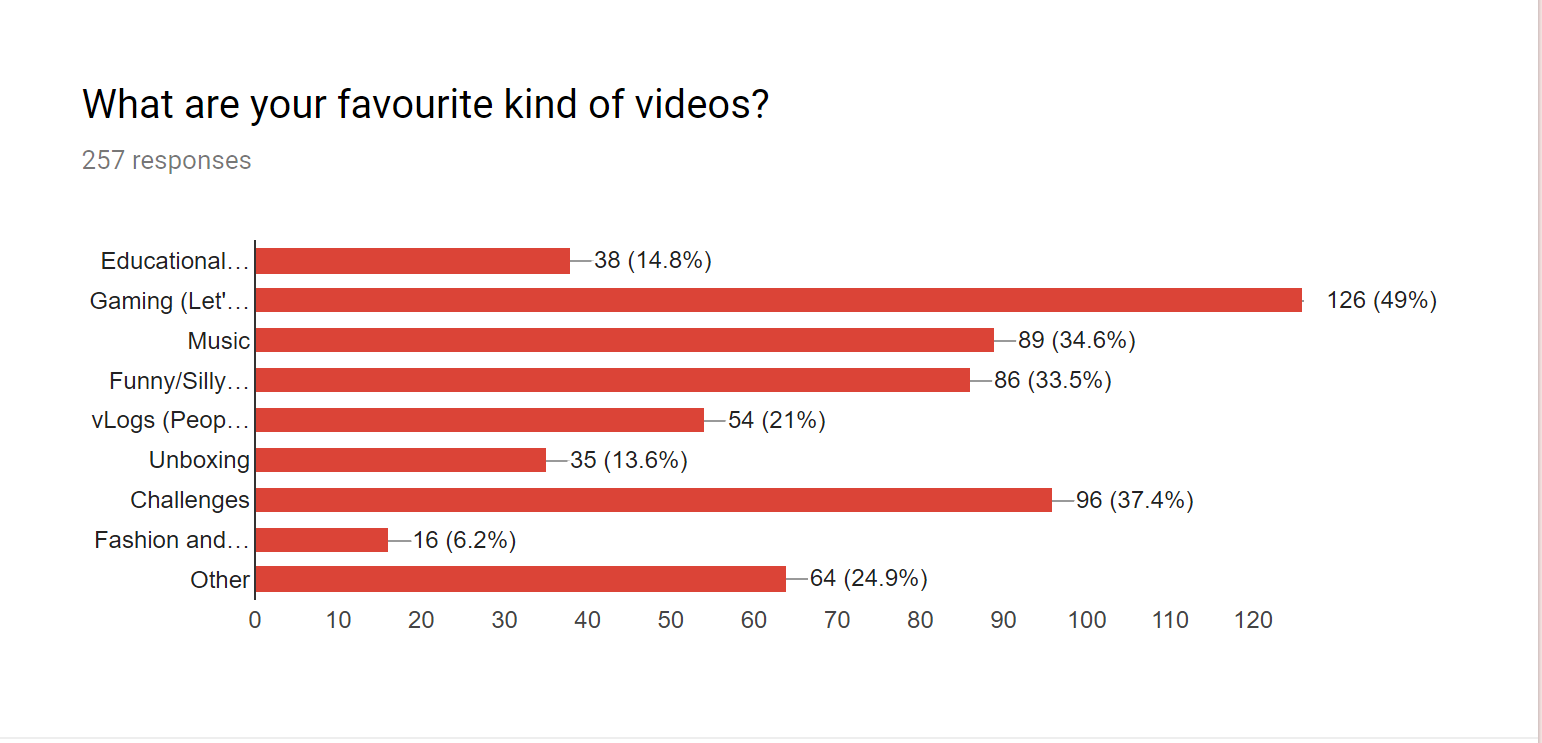
These categories were taken from YouTube analytics and Common Sense Media studies of the most popular genres of YouTube videos.
- "Let's play" videos (playing videogames with commentary) were by far the most popular category of video, highly popular with Grades 1-3 where they often do not have access to the games themselves.
- "Challenges" were a big trend popular with grades 2-5. Flash mobs, mannequin challenge and bottle flip are examples of these.
- Fashion and cosmetics, a huge category for YouTube and teens, was oddly only popular in Grade 3 (and a couple G5s).
- vLogs (video blogs) were non-existent in G1/G2, but very popular in G3+. This category is worth note because of the personal nature of the videos and likelihood of these YouTubers being role models for kids. This category often blends with Fashion and Cosmetics, where YouTube personalities may endorse products or discuss their personal lifestyle choices (including fashion). May include examples from all other categories.
- Educational (how-to) videos were very popular with 4th and 5th graders, but almost non-existent below that.
- Music was popular in all grades, Funny/Silly stuff in all grades.
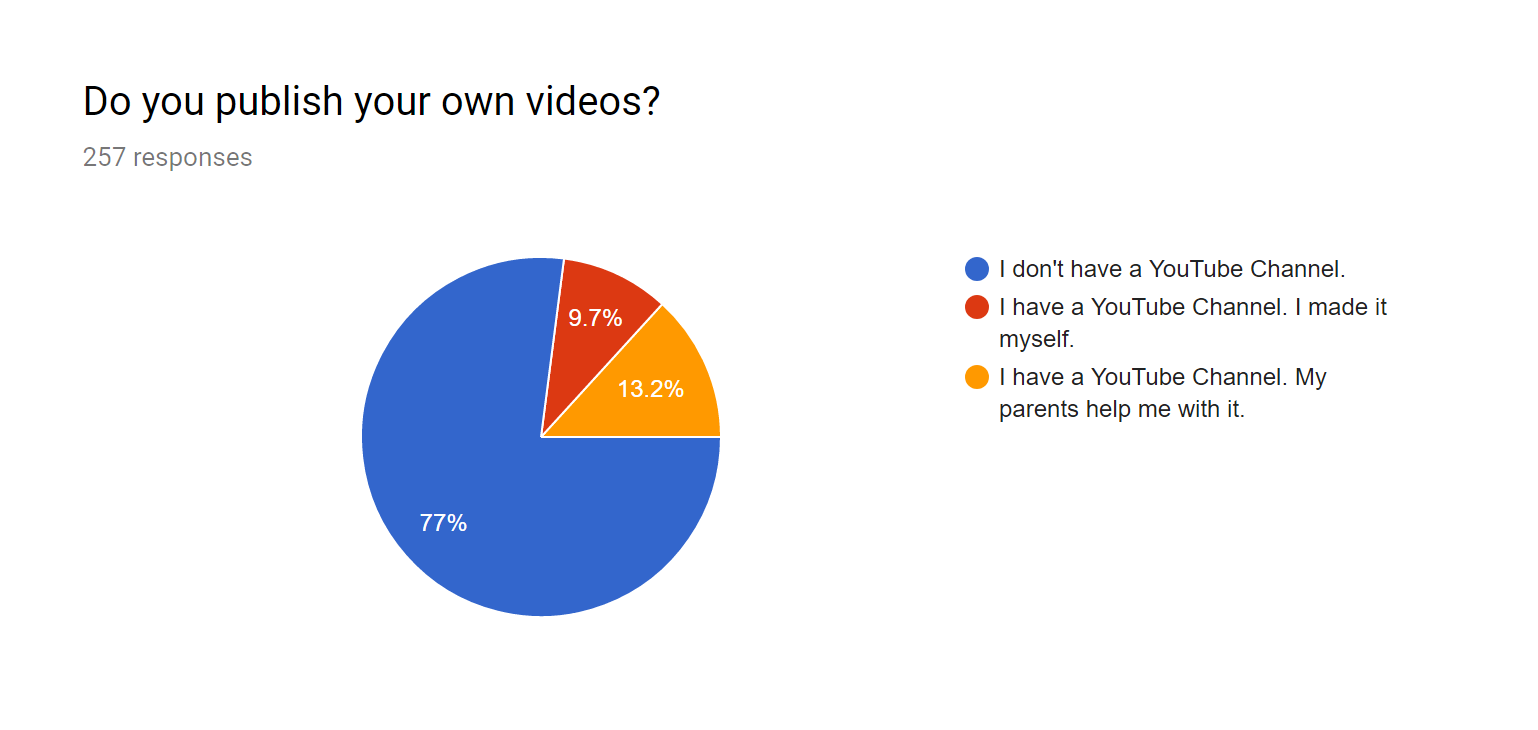
The 9.7% here that are publishing on YouTube without parental help are 25 students made up of 5th graders (11), 4th graders (8), and 3rd graders (6). Though this is a minority, it indicates an increased need for digital citizenship and privacy conversations regarding online publishing in these grade levels.
Please see the Parent’s Guide to YouTube video for more information on publishing and privacy.
Resources
Protecting Kids’ Privacy Online (Common Sense Media)
Google Account Privacy Information and Check-up
What Kids Are Really Watching (Common Sense Media)
Google Account Privacy Information and Check-up
What Kids Are Really Watching (Common Sense Media)
----------------------------------------------------------------------------------------------
Thank you so much for reading, watching, and being engaged with what your children are doing online.
It’s taken me a few months to complete this project, and I appreciate the patience of those who’ve been discussing it with me this whole time. I hope the time spent on research and in my own efforts to better understand our students will be valuable to everyone! Our students, our children, are living in a world with unprecedented access to media. It is our responsibility to become a part of that.
I welcome feedback, suggestions, your own experience and comments via ISPP email or comments here on the blog.
Yours truly,
Matt
PYP Technology Coach


